Squarespace Refresh 2025: The Year (and a bit) Of The Pro
This post may include affiliate links. If you buy through these links, I earn a small commission at no cost to you. This supports me in delivering useful content. Thanks for your support!
Squarespace is calling this year’s refresh the Year of the Pro, but it’s probably fairer to say it’s the Year (and a bit) of the Pro, since several of the biggest features have already slipped into 2026. Still, what’s here - and what’s promised - represents a serious step up for anyone building high-end sites without writing a line of code.
For people like me, who code solutions for Squarespace, this could be seen as a threat. Who’s going to hire me to code when they can achieve what they want by dragging and dropping? Personally, I see it as both a challenge and an opportunity. Every no-code tool that takes food off developers’ plates creates demand for motion designers, integrators, and specialists who can make the platform sing.
And ironically, I’m now more in demand for custom workflow integrations than front-end gloss.
What’s covered by the Squarespace Refresh 2025 product updates?
Refresh 2025 isn’t just about giving designers new toys - it’s a repositioning. Anthony Casalena and his team were explicit at Circle Day that this is the largest tooling investment in Squarespace’s history, and that they want the platform to be taken seriously by large agencies and enterprise clients, not just freelancers and hobbyists.
A lot of noise has been made about monetisation, but the real story here - at least for me - is threefold:
Squarespace for Pros (the design engine overhaul)
Beacon AI (the business assistant layer)
The revamped Circle Program
Monetisation features exist, but they’re not the star of the show.
Let’s dive in.
Want to test the Refresh 2025 features hands-on?
Start a free trial and play with the new tools in your own time.
Ready to publish? Use SILVA10 for 10% off your first year on an annual plan.
Looking back
Squarespace Refresh 2024 was about monetisation - Invoicing, Payments, Subscriptions - pushing Squarespace closer to Shopify than its original design-led roots.
There was also Blueprint AI, a site generator that could technically build a whole site, but in practice produced samey, cookie-cutter layouts. Even so, I found it useful because:
It’s better to improve a rough draft than start with a blank page.
1. Squarespace for Pros: The Real Headline Act
I’ve been building Squarespace websites since 2013. I’m heavily invested in the platform. I’m not an evangelist - if I see problems, I call them out. But the Squarespace for Pros initiative genuinely feels like the centrepiece of the Refresh 2025 promise.
This is the first time in years I’ve felt that Squarespace is delivering tools aimed squarely at the professional community, not the “my first website” crowd.
1.1 Finish layer
Among the many Refresh 2025 announcements, Finish Layer stands out. It brings proper motion design, layering and flex-based layout controls directly into the visual editor. There’s a raft of enhancements that will make it easier to create designs that are optimized for both desktop and mobile display.
When the Finish layer tools covered in the Squarespace Refresh 2025 announcement were demonstrated at Circle Day 2025 I found myself feeling surprisingly more positive than my usual snarky self.
Finish Layer swings the pendulum back towards creativity.
Layers
This may not seem interesting - layers have existed in design tools for decades - but their addition to Squarespace makes complex layout work far more manageable. The order of items in the Layers panel defines both the z-order and the content reading order for screen readers and crawlers. That’s a designer experience upgrade and an accessibility/SEO upgrade in one.
Stacks
Stacks are, frankly, a killer feature. You can group blocks together into a flexbox container, nest them, and control how they respond at different breakpoints. This is the first time the platform feels like it understands modern layout practices rather than pretending Fluid Engine somehow replaces CSS.
Custom fonts
A huge win, especially after so many popular built-in fonts vanished this year due to licensing changes. And, crucially, custom font delivery can be GDPR-compliant.
Transformations, animations and presets
Opacity, rotation, scale, skew, offsets—plus on-scroll, on-hover, on-load and mouse-follow animations. Tasteful default presets; enough power for specialists to go further.
For newcomers? Expect to see pages shimmering, spinning and bouncing their way into GPU meltdown.
But used carefully, this brings a level of polish previously reserved for hand-coded builds.
Mobile overrides
Change stack direction, visibility, alignment and more—per breakpoint—without hacking together CSS overrides.
Saved Sections
Cross-account saved sections are a brilliant workflow win for agencies.
1.2 Connected Commerce
Squarespace has been modernising the foundations of its commerce engine. A few highlights:
In-place product editing without being thrown into backend hell
Better style inheritance
Border radii, masks, aspect ratios
Product block visual parity with image blocks
These are practical upgrades aimed at reducing client confusion and reducing the support burden on designers.
1.3 Extensibility: The Delicate Tightrope
One of the more technical announcements was the introduction of a stable custom code spec—a guaranteed set of HTML data attributes developers can target without fear of future breakage.
On paper, this is long overdue. In reality, it’s complicated.
The perpetual struggle: modernisation vs stability
Squarespace is trying to modernise a front-end codebase built up over a decade. That means moving to new layout systems, animation engines, and design primitives. But every time they modernise the DOM, third-party code breaks.
This is the core issue:
You can’t stabilise selectors when the underlying system itself is still in flux.
This is (in my opinion) why the stable spec appears to have stalled. Squarespace cannot commit to immovable selectors while tearing out and replacing foundational markup.
Squarespace is attempting to stabilise things:
They recognise developer frustration
They want to be taken seriously by enterprise teams
They’re laying the groundwork for more robust APIs and extensions
However, Squarespace has not yet developed a process that alleviates the considerable stress and friction in the developer community.
APIs and Extensions
Products API now covers all product types
Future: abandoned cart, invoicing, commerce forms APIs
New extensions: Zapier, Monocle search, Tiny Currency, Local SEO, Shipday, Allday
This is a slow burn, not a revolution. But the direction is right.
Squarespace 2025 Refresh timetable
What’s Here Now and What’s Coming?
Launched
Custom Fonts
Layers Panel
Mobile Overrides
Saved Sections (cross-account)
In-place Product Editing
Beacon: Product Composer
Beacon: Alt-text / Metadata Fixer
Part launched
CSS Transforms - Available for shape and button blocks, others to follow
Custom Code Spec - Initial releases very sparse. Appears to have stalled
Coming Late 2025 / 2026
Animation Engine (scroll/hover/load/mouse-follow)
Stacks (flexbox containers)
Product Block Visual Controls
Beacon: Discount Generator
Beacon: FAQ Generator
Beacon: Privacy Policy / ToS Generator
Beacon: Broken Link Scanner
Beacon: AIO Scanner
Expanded Commerce APIs
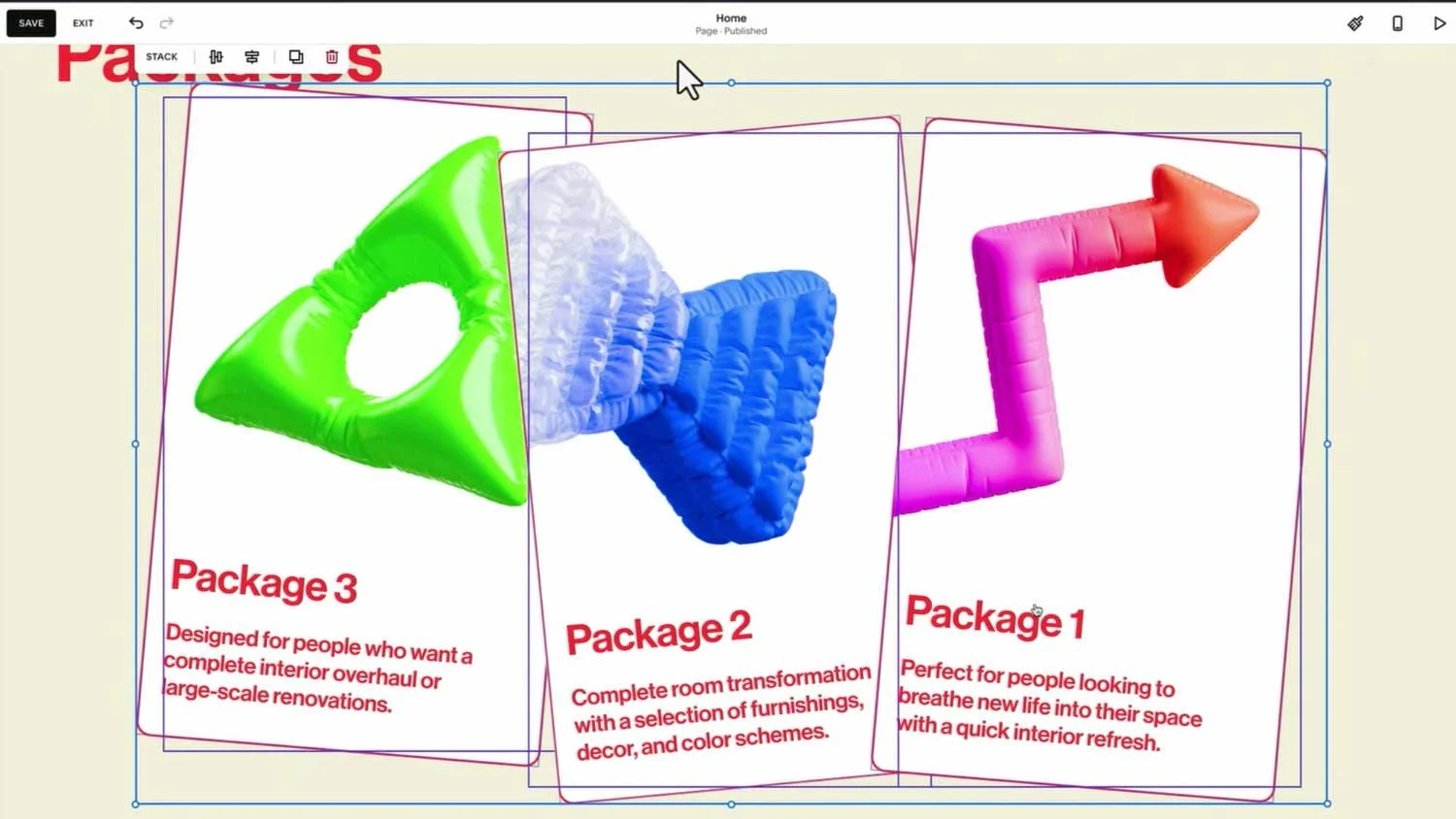
New no-code stacks and transforms add a level of finesse previously unattainable without custom code & css.
2. Bacon Beacon AI - One-Shot Tools in an Iterative World
When Beacon AI was first mentioned at Circle Day, I misheard it as Bacon AI. I’ve played Paul Gubbay’s keynote back many times and it still sounds like bacon to me. Whatever, I like bacon.. ..but I’m not so sure about Beacon
Squarespace describes Beacon as “your new business partner,” built into the platform, using your site data to proactively guide you. Some of this is already live; some is coming later in 2025.
Beacon is described by Squarespace as “your new business partner, built directly into Squarespace”. Beacon is positioned as a set of tools that “understand the data and the usage of your website” to help you build your business.
2.1 What Beacon Actually Does Today
Product Composer – generate product names, descriptions, even pricing
SEO Scanner / AIO metadata tools
Missing alt text detection + auto-generation
Discount Composer (coming soon)
FAQ Generator (coming)
Privacy / Terms generator (coming)
Broken Link Scanner (coming)
AIO Scanner (late 2025)
2.2 The One Shot Problem
Squarespace positions Beacon as your on-site assistant. But unlike ChatGPT, Claude or Gemini, most Beacon tools are one-shot:
You can’t:
Establish brand guidelines and tone of voice that persist across all interactions.. ..well you can, but only at a rudimentary level.
Work iteratively through conversation, refining outputs based on your feedback
Generate alternatives to compare different approaches
Maintain context across your entire project for consistency
Beacon AI generates a "first draft" and then... that's largely it.
That's fine for beginners.
But dangerous.
Because novices will likely trust the output uncritically, leading to a sea of cookie-cutter websites filled with AI-generated slop.
2.3 Why Beacon AI still matters
If you’re a pro, Beacon is occasionally useful:
Faster than hunting through the editor
OK for accessibility fixes
OK for metadata hygiene
OK(ish) for generating quick starter copy
But you will hit the ceiling almost immediately.
2.4 The Future Beacon (The Actually Exciting Part)
The most interesting Beacon feature wasn’t marketed as such. Near the end of the keynote, they demoed a future where Beacon becomes a full chat interface embedded inside the editor:
Ask: “How do I reorder products?”
Beacon answers and takes you to the right place
Ask: “Can you create a discount?”
Beacon does it
View business insights
Analyse orders, pricing, inventory
Recommend changes
This is genuinely promising.
If Beacon evolves into a UI control layer for Squarespace — a kind of command palette powered by LLMs — that will be transformative.
But that’s 2026+.
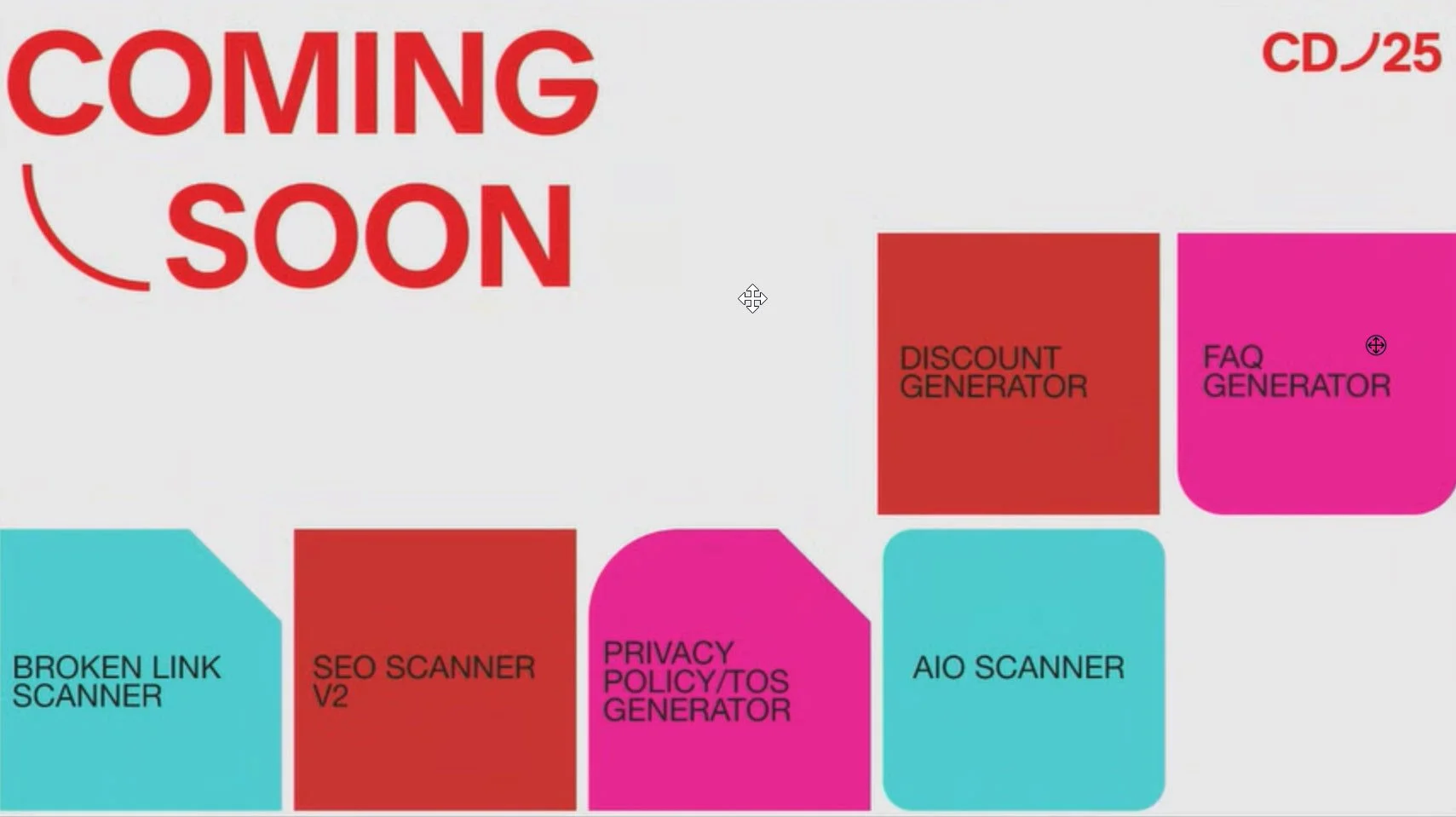

AIO Tools will suggest content areas to exploit for added AI search visibility.
3. The Circle Program: Incentives, Status and Structure
I see the Circle Program refresh as the third most important part of the 2025 update.
At Circle Day they announced a number of things, some of which were not that new:
Silver, Gold, Platinum statuses
A revamped Circle points system
100 points for migrating clients from 7.0 → 7.1
100 points for moving clients to Squarespace Payments
From 2026, money for every annual subscription (no thresholds)
The new Circle Dashboard: points, payouts, activity, events, resources
Of the above, I only really care about the Circle Dashboard because it puts certain things in one place that I previously had to jump between sites to find.
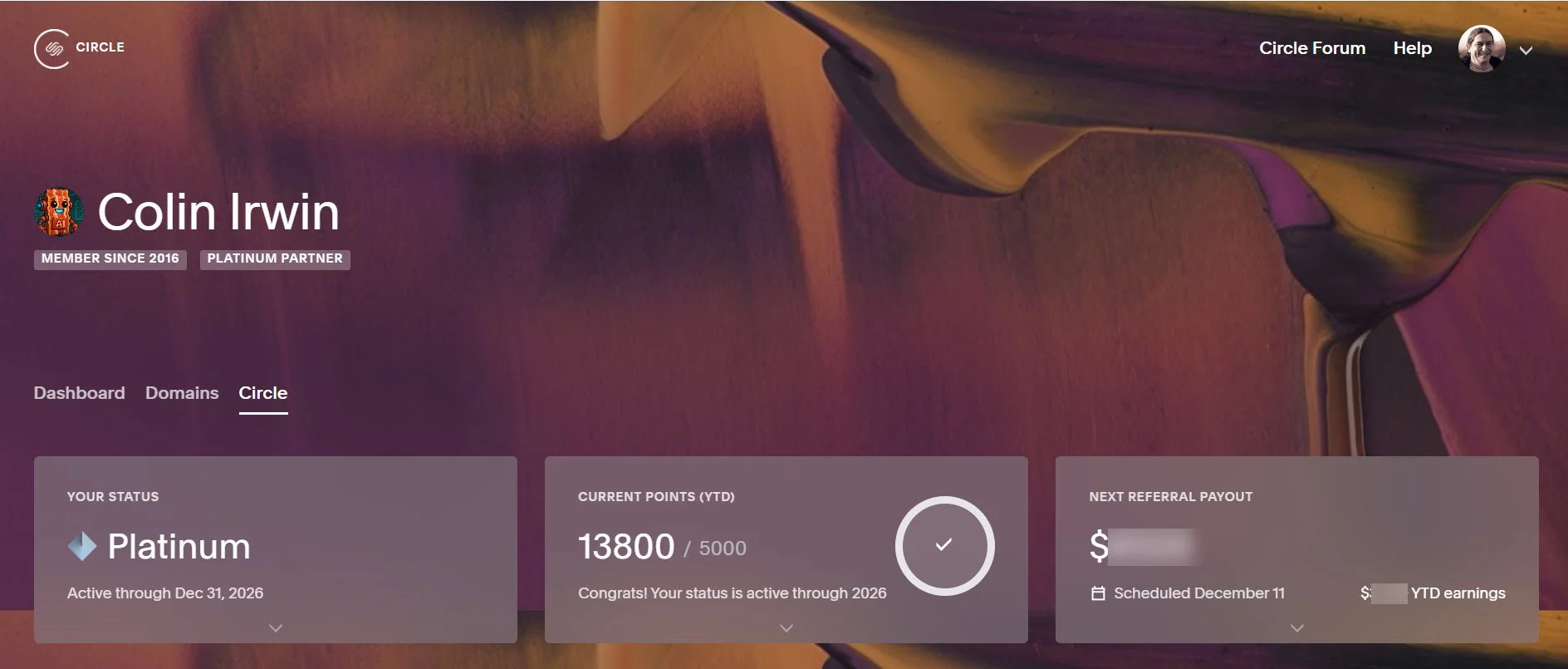
Circle Dashboard - Status, Circle points and Referral summary all in one place.
4. Squarespace Payments, Invoicing and other financial solutions
Squarespace expanded its financial offerings:
Squarespace Balance (same-day earnings access, business cards)
Squarespace Capital (small-business financing)
Instant Payouts
Pay Links
These feel like table stakes. Competitors already offer similar financial tools. They round out the platform, but they’re not groundbreaking.
FAQs About Squarespace Refresh 2025, Beacon AI, Bio Sites and More
How does Squarespace Refresh 2025 change the way I design websites on Squarespace?
Squarespace Refresh 2025 introduces a major shift in website design through new layout controls, the Finish Layer, and a stronger emphasis on ai-powered workflow enhancements. These new features let you create more customizable, professional results without relying on code. If you’re currently working with a traditional template, Refresh 2025 allows you to streamline your process, curate reusable sections, and optimize your site’s visibility and performance across devices.
What exactly is Finish Layer, and why is it important for designers using Squarespace?
Finish Layer is a suite of design tools that adds animation, new layout options, advanced styling and transform controls directly into the editor. It’s part of Squarespace Refresh 2025, and it allows designers to simplify complex builds, improve SEO through structured layering, and deliver more polished website design without writing custom CSS. Finish Layer also improves workflow by letting you import external elements, adjust stacking order, and optimize images and alt attributes for better visibility.
What is Squarespace Beacon AI, and how does it affect business owners?
Squarespace Beacon AI is positioned as an ai-powered business partner that offers guidance across your site. It can automate tasks like alt-text generation, metadata cleanup, basic copywriting, discount creation, and even product listing setup. It’s meant to simplify and speed up workflows, giving practical help with seo, checkout, marketing tools, and day-to-day running a business. However, Beacon AI currently generates one-shot outputs - useful for quick starts but not as iterative as something like ChatGPT.
How is Beacon AI different from Blueprint AI?
Blueprint AI acts as a starter tool that assembles a new site using designer-made templates, placeholder content, and preset layout structures. It speeds up early website builder stages like page creation and copy seeding.
Beacon AI, by contrast, focuses on optimisation: fixing metadata, cleaning up images, offering suggestions, and helping streamline workflow as you maintain or grow a site. You can think of Blueprint as “setup” and Beacon as “improve and optimize.”
What changes were made to Squarespace Domains as part of Squarespace Refresh 2025?
Squarespace continues to streamline domain management, making it easier for users to register TLDs, transfer domains, and keep DNS records aligned with updated security standards. Combined with Beacon AI’s metadata and visibility tools, domain owners get better overall guidance for seo and brand consistency. Refresh 2025 doesn’t radically overhaul domain tools, but it strengthens the surrounding ecosystem.
How do Squarespace’s financial solutions like Squarespace Capital and Squarespace Balance fit into Refresh 2025?
Squarespace Capital offers capital loans to eligible users to support business growth, while Squarespace Balance provides a financial account for same-day earnings with optional business spending cards. These tools aren’t revolutionary but help streamline financial tasks like invoice tracking, payouts and running a business. They sit alongside instant payouts and other financial tools that improve the business side of the website builder experience.
Are there new marketing tools included in Squarespace Refresh 2025?
Yes. Refresh 2025 expands marketing tools through improved analytics, automated SEO suggestions, alt-text assistance, and tighter integration with acuity scheduling, email campaigns and product listings. Beacon AI suggests new ways to enhance visibility, streamline workflow and curate more effective landing pages using ai-powered guidance.
Can I import external fonts now, and does this help with SEO or visibility?
Yes - Refresh 2025 introduced the ability to import external fonts, which means you can go beyond the built-in font library and maintain brand accuracy. While fonts don’t directly affect seo, better typography can improve usability, clarity, and visibility. Plus, the new font tools integrate smoothly with Finish Layer, improving overall website design consistency.
Does Squarespace Refresh 2025 help with SEO?
Yes - seo is one of the quiet winners of Squarespace Refresh 2025. Beacon AI helps generate missing alt text, scans for metadata issues, and identifies areas to optimize. Finish Layer helps ensure clearer layout hierarchy, which improves how search engines read your page. The new AIO tools are also focused on ai-driven search behaviour, which is becoming increasingly important as users turn to AI assistants over traditional search engines. However, in the hands of a novice the results are likely to be hit and miss.
What’s the best way to use the new Squarespace tools to streamline running a business?
The strongest improvements for streamlining running a business come from a combination of Beacon’s nudges and the new financial tools like Squarespace Balance, capital loans, instant payouts and improved workflow automation. For design workflow, Finish Layer makes it easier to curate reusable sections, optimize layouts, simplify mobile design and support business growth without needing custom code.